Crestron vs Josh.ai: One Processor or Independent Subsystems?
Two ways to run a luxury home. One puts the brain in a single processor. The other lets each system keep working and puts a smart layer on top.
By Pete Sandford, Smarter Homes. Updated October 2026. We are not a Crestron dealer. This is the view from the service side, from taking over homes that were built that way.
What actually differs
Where the logic lives
Processor-centric: One central processor runs lighting, audio, video, and scenes
Subsystem-based (Josh.ai): Each system runs on its own controller: Lutron lighting and shades, the alarm panel, the network, the audio rack
If the main processor fails
Processor-centric: Rooms that depend on it can stop responding, and a programmer usually has to come to the house
Subsystem-based (Josh.ai): Lights, shades, locks, and alarm keep working on their own. Only the top control layer is out until it is restored.
Typical fix
Processor-centric: Site visit and reprogramming
Subsystem-based (Josh.ai): Often a remote login
Brand lock-in
Processor-centric: Tends to be one brand, one programming dealer
Subsystem-based (Josh.ai): Mix the best product for each job. Replace one piece at a time.
Upgrades
Processor-centric: Frequently a full reprogram
Subsystem-based (Josh.ai): One subsystem at a time
The failure behavior in the table is a design pattern we see in the field, not a statement about every Crestron installation. A well-built, well-supported Crestron home can run for years.
What an all-in-one processor costs you over time
When one processor holds the programming for the whole house, that processor becomes the health of the home. As the hardware and the code age, a dropped scene or a dead keypad turns into a service call. The fix needs the person who wrote the program, and that is usually the original dealer. You are tied to one brand and one programmer, even if the relationship has gone sour.
That is how most of the homes we are asked to rescue arrived: remotes in every room, an aging processor, and a pattern of service visits that never solved the root cause.
We wrote up one of them as a case study: a legacy Crestron home moved to standardized subsystems with a modern network, a Lutron-compatible lighting platform, rack power protection, and an Alarm.com security takeover. See the details below.
Subsystems on the bottom, Josh on top
We design homes so each subsystem works on its own. Lutron handles lighting and shades (Lutron lighting). The alarm panel handles security. A managed network handles Wi-Fi and cameras. Josh.ai sits on top as the control and intelligence layer.
If the Josh processor goes offline, the lights, shades, locks, and alarm keep doing their jobs. What you lose is the unified touchscreen, voice, and app experience until Josh is back. In most cases we restore that with a remote login, not a truck roll.
The big misconception: it is not just voice
Many people think Josh.ai is a voice assistant and nothing else. Josh sells a full set of control hardware and an app:
In-wall touchscreens
8-inch and 10-inch touchscreens with a built-in tap-to-talk button, hardwired over PoE. Room controls, scenes, and whole-home dashboards.
Josh Edge remote
A machined-aluminum handheld with a tap-to-talk button, six swappable buttons for lights, shades, fans, music and scenes, and no screen to distract.
Voice microphones
Josh Micro and Josh Nano far-field microphones add voice to the rooms where you want it, without a speaker box on the counter.
The Josh app
Whole-home, room, and device control, plus security controls, automations, and push notifications.
Bedside control
Touchscreens and the Edge remote work at the bed, so you do not need to reach for a phone.
Security in the same app
Arm and disarm, check entrances, and see gate, garage, and lock activity next to your lights and shades.
Josh and your alarm, working together
Josh does more than voice. It can arm and disarm a supported alarm system and watch the state of entrances, gates, garage doors and locks, then send push alerts when they change. A change in the alarm panel can trigger a scene, and a scene can affect lights, shades, music, and other devices (Josh.ai on self-monitored security).
In our designs, Josh ties into the Alarm.com ecosystem. Motion detection, glass break, door sensors, temperature sensors, garage door control, and locks all feed the same automation layer. That is how a leave-the-house scene works:
- Your phone leaves the geofence around the alarm panel, or you arm the system.
- Doors lock.
- Shades drop.
- Lights turn off.
- Audio and video shut down, because the home knows nobody is in it.
Josh builds the scenes. Alarm.com supplies the sensing and the arm state. Lutron carries out the lighting and shade commands locally.
Josh.ai lists supported alarm panels in its dealer portal. Ask us which panel fits your home before you buy equipment.
From processor life support to a home that just works
A legacy Crestron home with remotes in every room had become a high-visit-count, high-fee support trap. We replaced the all-in-one dependency with standardized subsystems.
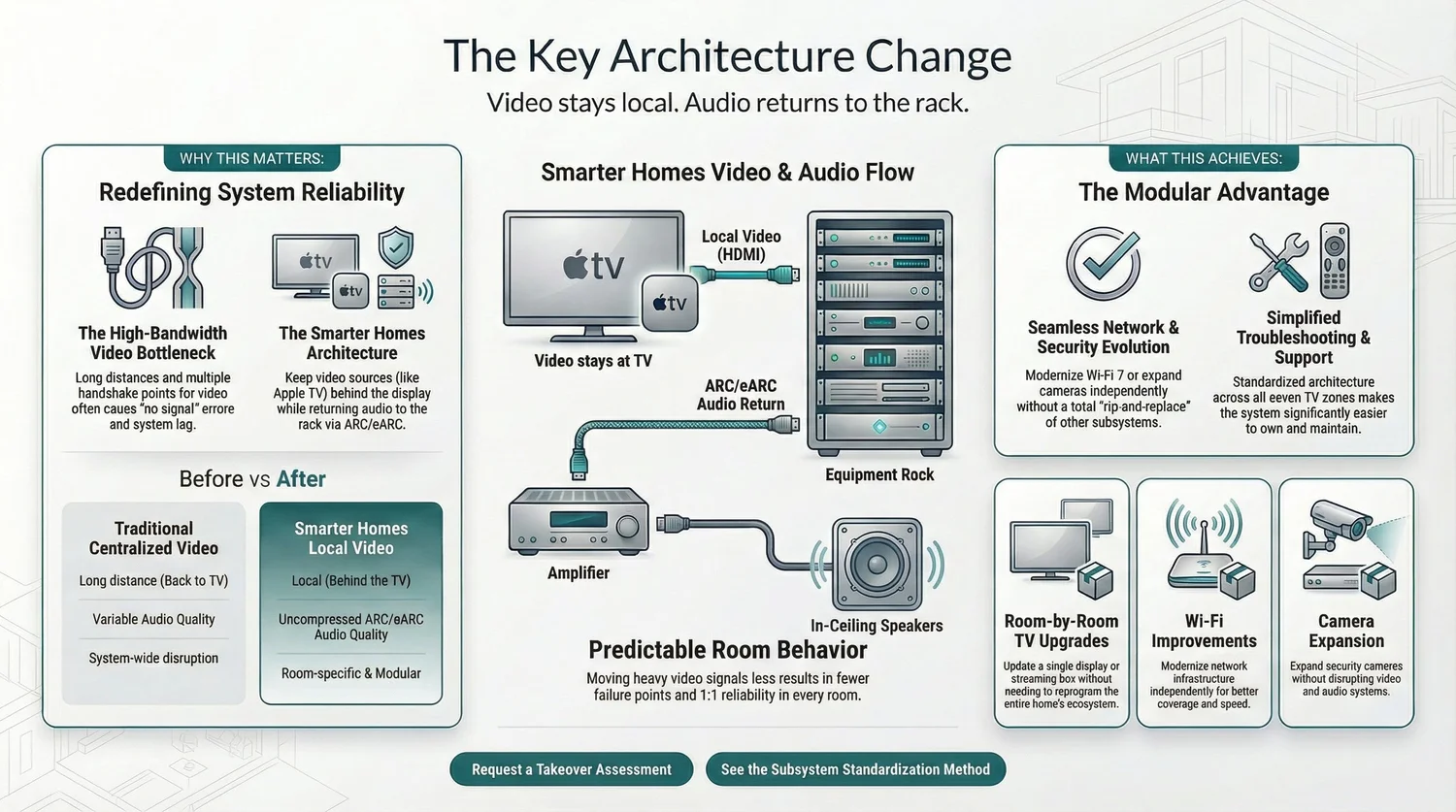
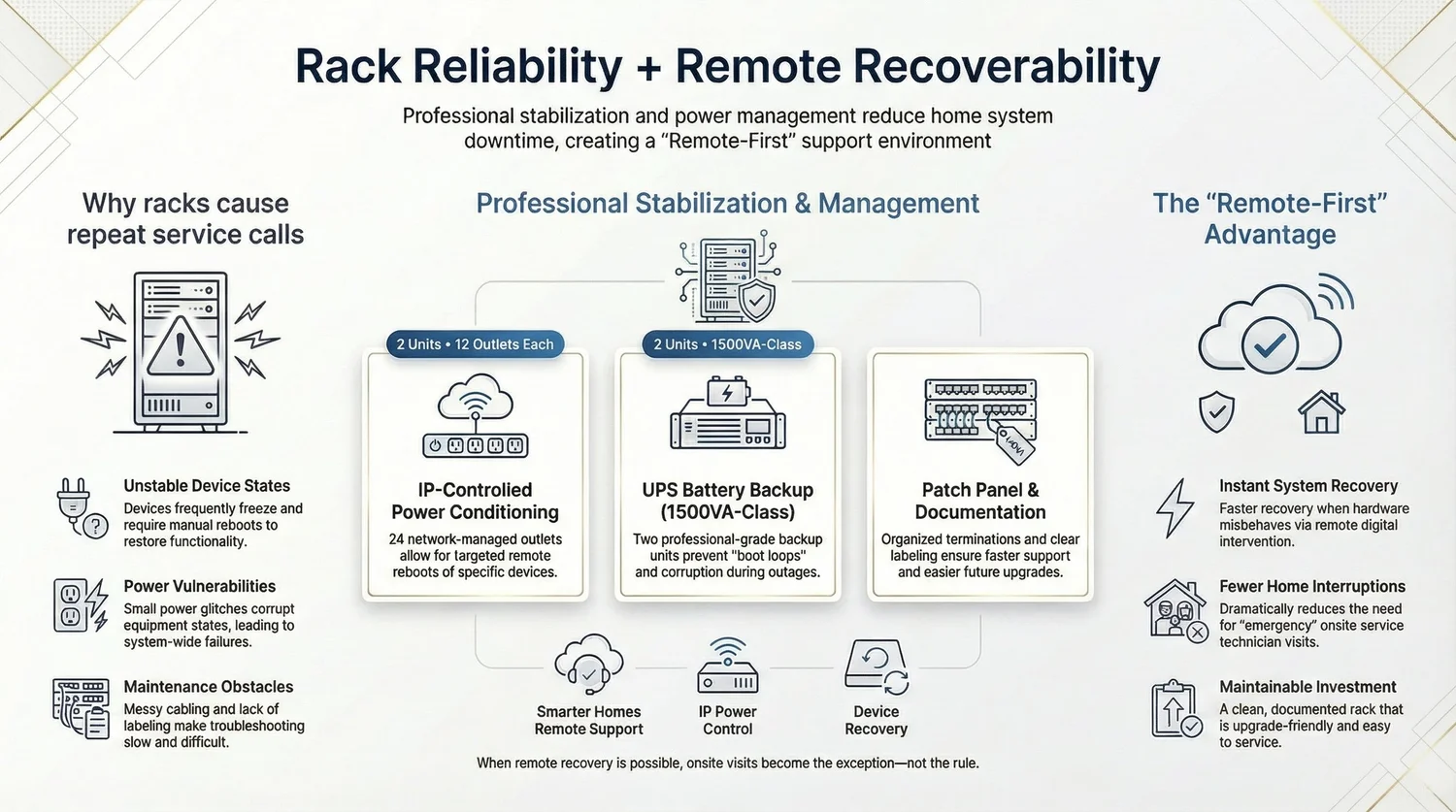
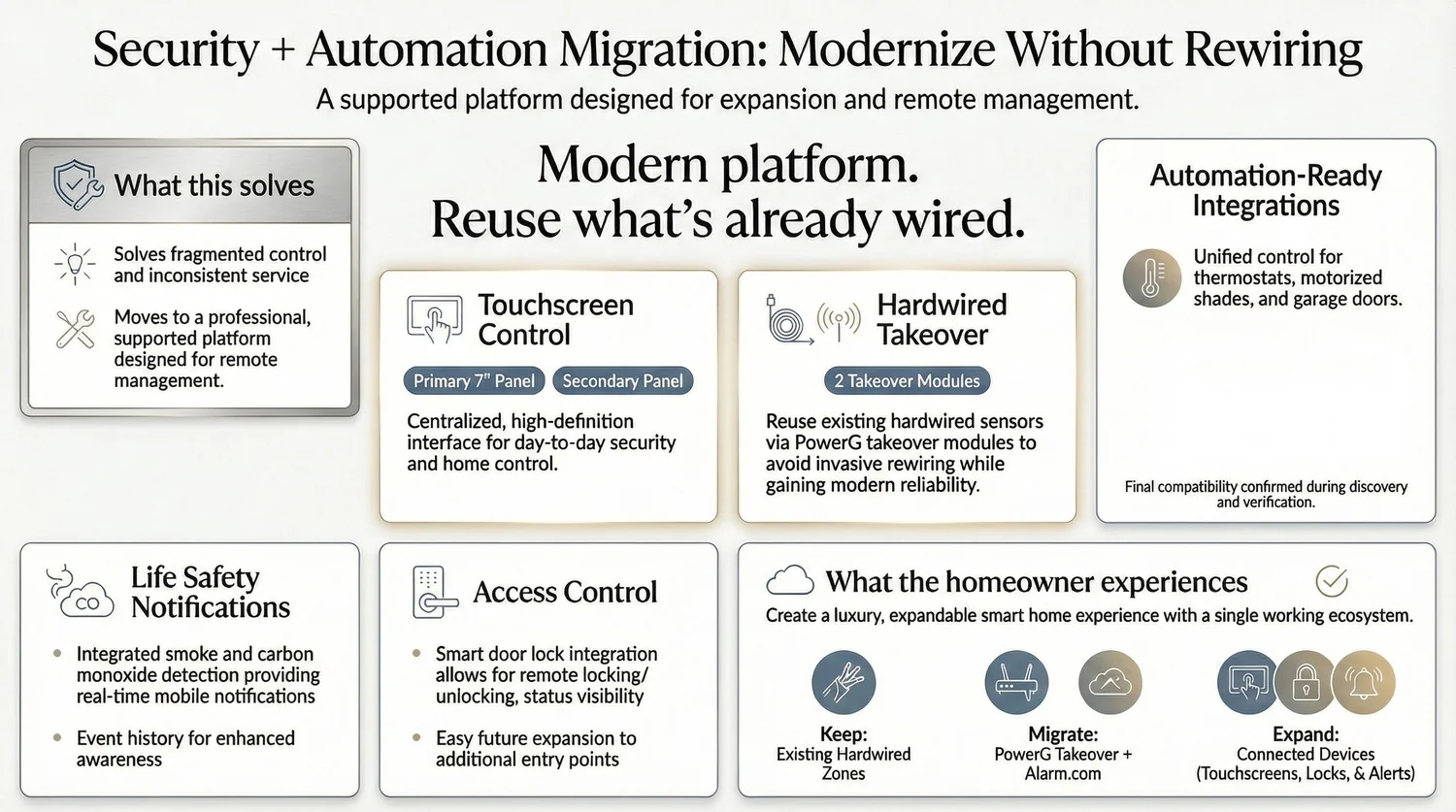
- 7 standardized TV zones with the same simple remote in every room.
- Wi-Fi 7 with 6 indoor access points and 1 outdoor access point.
- Security takeover with Alarm.com and a hardwired PowerG zone takeover.
- Cameras moved from Reolink to UniFi Protect with an NVR and storage.
- Rack reliability: 2 IP power conditioners and 2 UPS units, with remote recovery.
The client's words: "We didn't need another reboot-and-bill cycle. We needed a system that could be supported without constant onsite visits."
Which is right for your home
Choose a processor-centric system if you already have a well-supported installation and a dealer you trust. Choose a subsystem design if you want to keep lighting, shades, security, network and audio independent, use best-in-class products, and have the freedom to change dealers or upgrade one piece at a time. We can also help take over a home you already have. See our West Lake Hills project and showroom.
Crestron vs Josh.ai FAQ
Is Josh.ai only a voice assistant?
No. Josh.ai also makes 8-inch and 10-inch touchscreens, the Josh Edge remote, Josh Micro and Nano microphones, and an app that includes security controls and notifications.
What happens if the Josh processor goes down?
In our subsystem designs, lighting, shades, locks, and the alarm keep working on their own controllers. You lose the unified Josh layer until it is restored, which can often be done through a remote login.
Why do you say processor-centric systems are riskier?
When one processor holds the logic for the whole house, a failure can take a lot of rooms down at once, and repairs usually need the original programmer. That is a design trade-off, not a rule for every installation.
Does Smarter Homes sell Crestron?
No. We do not sell Crestron. We do take over and replace Crestron systems.
Can Josh.ai work with my Lutron system?
Yes. Josh integrates with Lutron. See our Josh.ai page.
Does Josh.ai work with Alarm.com?
We design Josh with Alarm.com security in our projects. Josh also lists other supported alarm panels. Ask us which one matches your home.
Can I replace a Crestron system without rewiring the house?
Often yes. We start with an inventory of what to keep, reconfigure or remove, then design the subsystems.
